Pool Features
- Overview
- Pool Dashboard
- My Picks
- Leaderboard
- Discussion
- Stats
- Entry Grading
- Pick Reminders
- Missing Picks Report
- Auto Picking
- Mulligans
- Host Tools
Overview
My Survivor Pool includes pool pages, pick tools, standings, communication features, reminders, grading, and host management tools. This page is a quick reference for what each feature does.
For setup instructions, see Hosting a Pool and Pool Settings. For entrant pick workflow details, see Making Picks.
Pool Dashboard
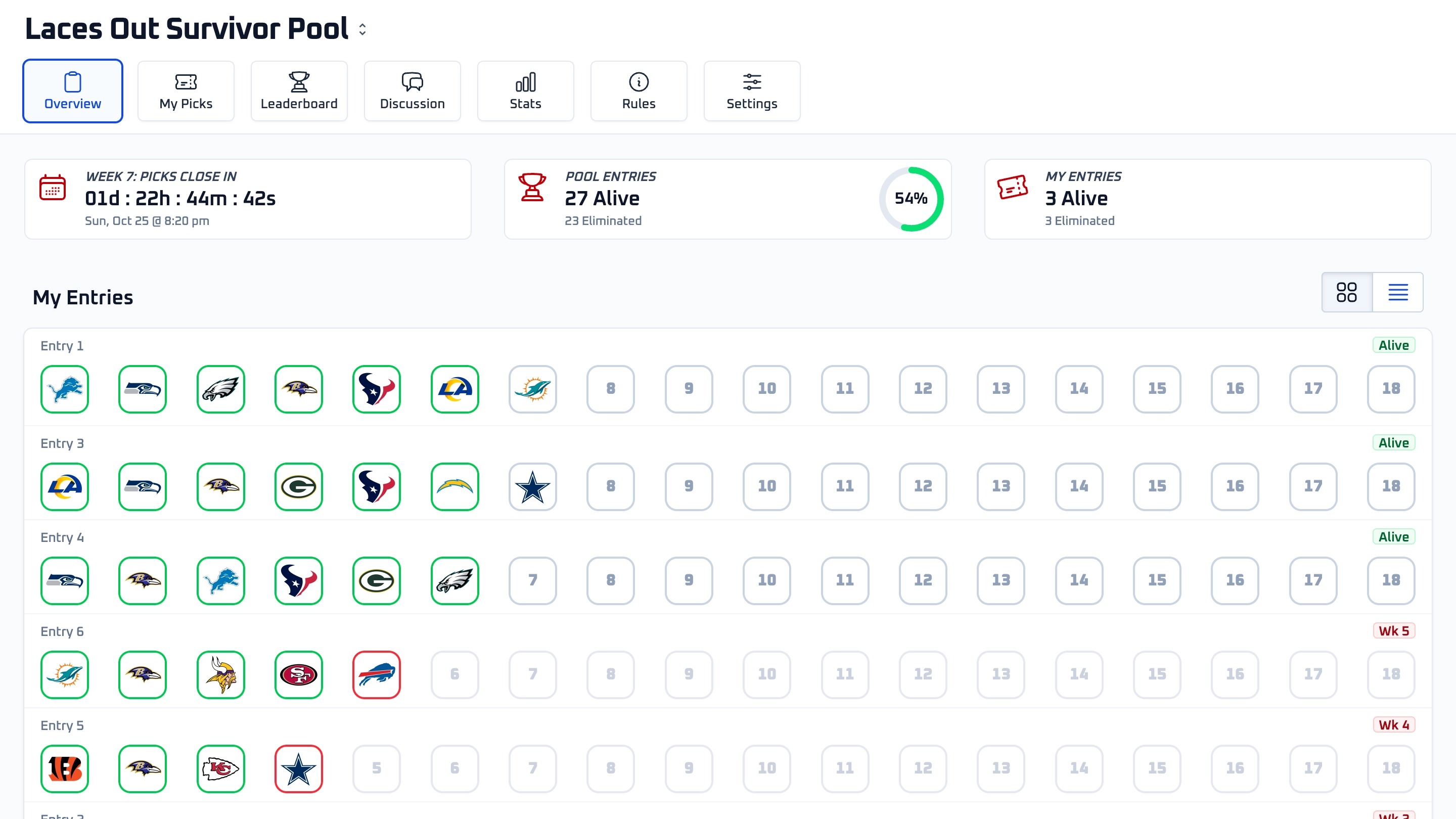
Each pool has its own dashboard with tabs for Overview, My Picks, Leaderboard, Discussion, Stats, and Rules. Hosts also see Settings.
The Overview tab highlights the current pick deadline, pool entry counts, your entry status, and your entry cards. Hosts also see quick links for settings, invitations, entry management, and pool size.
Entry cards show current-week pick status and give entrants a fast way to open the picksheet when picks are still available.
My Picks
The My Picks page gives each entrant a focused place to manage picks across the season. Entrants can choose an entry, choose a week, view that week's games, and confirm picks.
The page also shows a week-by-week pick summary. Unlocked picks can be removed or changed; locked picks cannot be changed after the pool deadline or selected team's kickoff.
Multi-pick weeks are supported here too. When a week requires more than one pick, the picksheet shows how many picks are required, submitted, and still missing.
Leaderboard
The Leaderboard shows each entry's current status and week-by-week picks. It supports searching, filtering by status, and filtering by current-week pick state.
Picks stay hidden until they lock. Once revealed, team logos appear in the standings. Multi-pick weeks show multiple team logos in the same week cell.
Mulligans are also marked on the leaderboard so entrants can see when an entry survived a loss with a mulligan.
Discussion
The Discussion tab gives each pool a shared place for announcements and conversation. Hosts and entrants can post comments in one pool-specific thread.
Discussion notifications depend on each user's notification preferences. A new-comment indicator appears in the pool navigation when there are unread comments.
Stats
The Stats tab summarizes pool activity across the season. It includes team pick counts by week and entry status trends by week.
Pick-count stats are based on locked picks, so they become more useful as games lock and picks are revealed.
Entry Grading
My Survivor Pool grades entries automatically as game results become available. Correct picks keep entries alive. Losing picks eliminate entries unless the entry has an applicable mulligan.
Once all games in a week are complete, the pool advances to the next week. Hosts can monitor status from the Leaderboard and host Entries tools.
If a host needs to manage a specific entrant's picks or entry status before grading, those tools are covered in Managing Entries.
Pick Reminders
My Survivor Pool can send reminder emails to entrants who are missing picks for the current week. Reminders help entrants stay aware of upcoming deadlines, but entrants should still check their pool directly.
Hosts can also use the Entries page to see missing picks and send private messages to selected entrants when needed.
Missing Picks Report
The Missing Picks Report helps hosts identify entries that still need picks. The report lists missing entries and, for multi-pick weeks, how many picks are still missing.
Hosts can also check missing-pick status at any time from the pool's Entries page.
Auto Picking
Auto picking assigns picks to entries that are still missing picks when the weekly deadline is enforced. The assigned pick is based on the auto-pick strategy configured by the host.
Strategies include choosing from the most-picked teams, least-picked teams, or a random eligible team. Auto picking respects the entry's used teams and the available teams for that week.
For setup details, see Pool Settings.
Mulligans
Mulligans let entries survive losses when the pool rules allow them. Automatic mulligans are configured in pool settings and apply during grading.
Hosts can also grant manual mulligans to selected eliminated entries from the host Entries tools. Manual mulligans are useful when a host needs to apply a pool-specific exception.
For setup details, see Pool Settings. For manual host tools, see Managing Entries.
Host Tools
Hosts have additional tools for settings, invitations, join link management, entry management, host-managed picks, private messages, exports, and pool size upgrades.
The host workflow is documented across Hosting a Pool, Pool Settings, and Managing Entries.