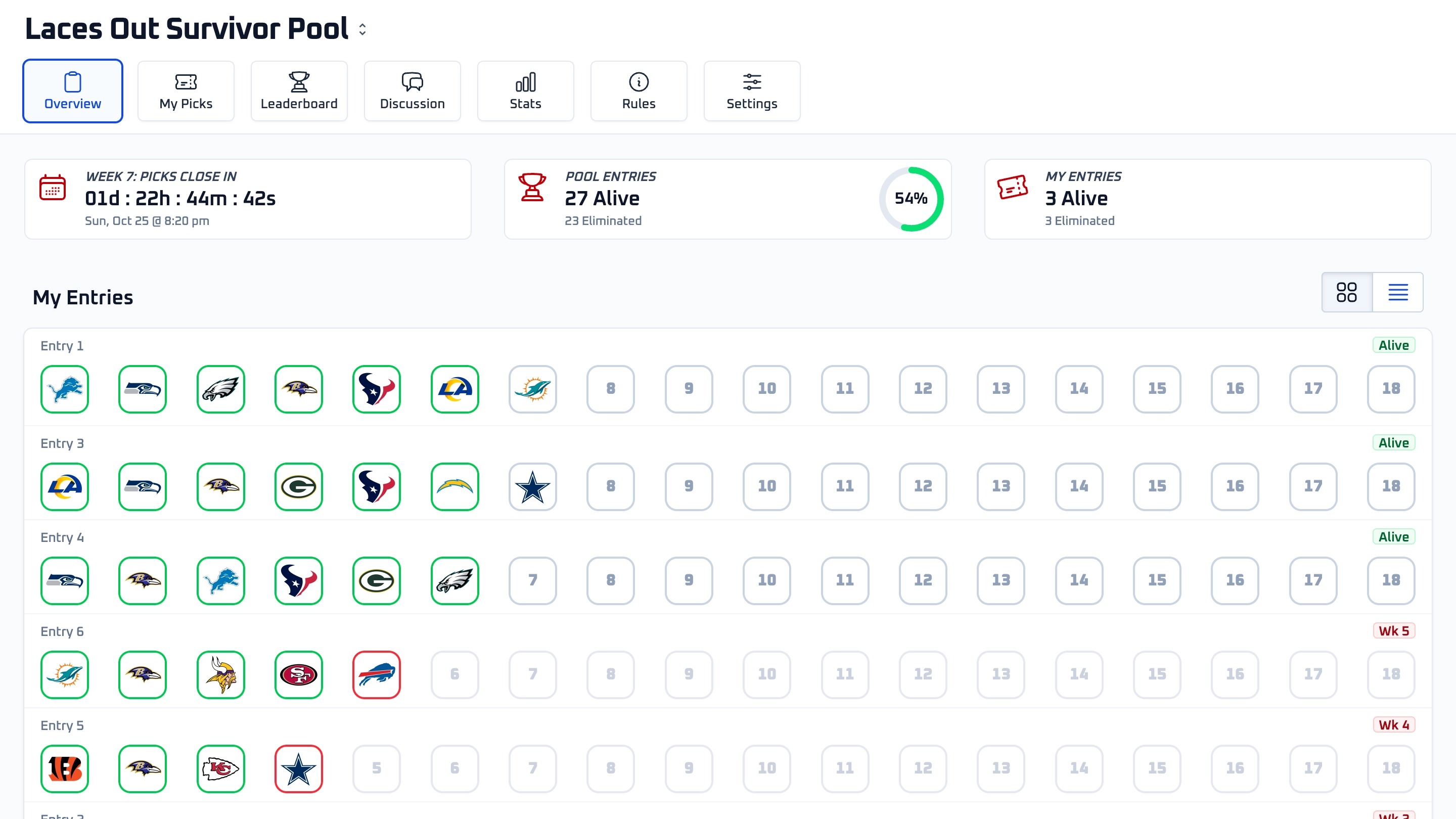
In a survivor pool, each entry picks one NFL team to win each week. If the pick wins, the entry survives and advances. If the pick loses, the entry may be eliminated unless the pool allows mulligans. Each team can only be used once per entry during the season.
Hosting a Pool
Yes. You can start free with up to 10 entries, then upgrade as your pool grows.
Start Free
Yes. Increasing your pool size is available from settings. If you upgrade later, the available upgrade options are based on the difference between your current pool size and the new one.
Pool Basics
Yes. Hosts can choose how many entries each participant is allowed to have. Some pools allow a single entry per player while others allow multiple entries.
Max Entries Per User
Yes. Hosts can choose a later start week when creating the pool. Entries begin making picks starting with the selected week.
Start Week
Pricing
My Survivor Pool is free for pools with up to 10 entries. Paid tiers are available for larger pools, including entry limits of 25, 50, 100, 250, 500, and unlimited entries.
Pricing & Pool Size
Yes. For pools larger than 10 entries, hosts must choose a pool size and complete payment upfront. This helps prevent abandoned pools and avoid confusion for participants who have already joined. If you'd like to try the platform first, you can host a pool with up to 10 entries for free for the entire season.
Pricing & Pool Size
That's okay. Start with the pool size that best matches your expected participation. If your pool reaches its entry limit, you can upgrade to a larger pool size at any time and only pay the difference between your current pool size and the new one.
Pricing & Pool Size
Pool size is based on the total number of entries allowed in the pool. Available options include up to 10 entries for free, then paid tiers for 25, 50, 100, 250, 500, and unlimited entries.
Pricing & Pool Size
Yes. Hosts can upgrade to a larger pool size later. When upgrading, the price is based on the difference between the current pool size and the new one.
Pool Basics
No. My Survivor Pool charges the host based on the pool entry limit. Participants can join, manage entries, and make picks without paying My Survivor Pool.
Hosting a Pool
Joining a Pool
Yes. Participants need a My Survivor Pool account to join pools, manage entries, and make picks.
Joining a Pool
Most entrants join from a Join Link shared by the host. The link guides you through signing in or creating an account, reviewing pool details, and joining the pool.
Joining a Pool
Some hosts add an optional pool password. If the pool requires one, enter it on the join screen before joining. Pool passwords are managed by the host.
Pool Password
A pool may be closed if it has already started, reached its entry limit, or is no longer accepting new entries.
Join Screen
Ask the host for the current Join Link. If the host reset the pool code, older Join Links no longer work.
Joining Troubleshooting
Making Picks
Open My Picks, choose the entry and week, select the team you want to pick, and confirm it. Once confirmed, the team appears in your picks for that week.
Making a Pick
You can change or remove an unlocked pick before it locks. Once a pick is locked by the pool deadline or the selected team's kickoff, entrants cannot change or remove it.
Changing or Removing Picks
If your pool uses a Pick Deadline, picks lock at that deadline for the week. If there is no fixed deadline, each pick locks when the selected team's game kicks off.
Pick Locking
A team may be unavailable because its game has already started, the pool deadline has passed, the team was already used by that entry, or the week already has all required picks submitted.
Making a Pick
No. Each entry can use a team only once during the season. Team usage is tracked separately for each entry.
Team Reuse
No. Team usage is tracked separately for each entry. Using a team on one entry does not prevent you from using that same team on another entry.
Team Reuse
Picks are hidden from other players until the selected team's game kicks off. After kickoff, picks are revealed on the leaderboard.
Pick Visibility
Pool Rules and Features
Yes. Hosts can choose a fixed weekly deadline for picks. Otherwise, picks lock individually when each selected team's game kicks off.
Pick Deadline
Yes. Hosts can configure multi-pick weeks that require entrants to make more than one pick in selected weeks. To survive the week, all required picks must win.
Multi-Pick Weeks
All required picks for the week must win. If any required pick loses, the entry is treated as a loss for that week and may be eliminated or use a mulligan if available.
Multi-Pick Weeks
No. The same team cannot be selected more than once by an entry during the season, even during multi-pick weeks.
Team Reuse
If required picks are not submitted before eligible games have started, the entry may be eliminated. If auto-picking is enabled, the system may assign a pick based on the host's selected strategy.
Missed Picks
Auto-picking assigns a team to entries that are still missing picks when the weekly deadline is enforced. Strategies include most-picked teams, least-picked teams, or a random eligible team.
Auto Picking
Mulligans let entries survive losses when pool rules allow them. Automatic mulligans are configured in Pool Settings, and hosts can also grant manual mulligans from entry management tools.
Automatic Mulligans
Yes. Hosts can configure automatic mulligans, allowing entries to survive a specified number of losses before being eliminated.
Automatic Mulligans
Hosts can decide whether tie games count as a win or a loss. The setting applies to all picks moving forward.
Ties
Host Tools
Yes. Hosts can set, update, or remove picks on behalf of entrants from the Manage Picks action in the entry management tools.
Manage Picks
Yes. Hosts can manually grant a mulligan from an individual entry action or by selecting entries and using the bulk action menu.
Granting Mulligans
Yes. Hosts can export a CSV from the Entries page. The export includes entry names, entrant names, status, and any host notes.
Exporting Entries
No. Private messages are delivered by email only and are not posted on the pool discussion board.
Private Messages
Yes. Hosts can save private notes on entries for their own reference. These notes are only visible to the host.
Managing Entries
The Missing Picks Report helps hosts identify entries that still need picks for the current week, including any additional picks required during multi-pick weeks.
Managing Entries
Troubleshooting
If you are having trouble joining a pool, making picks, accessing entries, or using host tools, start with the troubleshooting guide. It covers common issues and next steps for hosts and entrants.
Troubleshooting